Content filtering that fits.

Managed across every device — for families, teams and schools. You set the rules; we run it.

Now in beta

Sensible rules for every age — on every device they use.

Managed content filtering for your kids' devices. Pick a child's age and Zaksha applies sensible rules and schedules — homework hours, bedtime, weekend limits — across every device they use. Set it once; it runs itself. No hardware, nothing to install on cooperative devices.
Your whole household Wi-Fi & mobile data From ₹149 / month
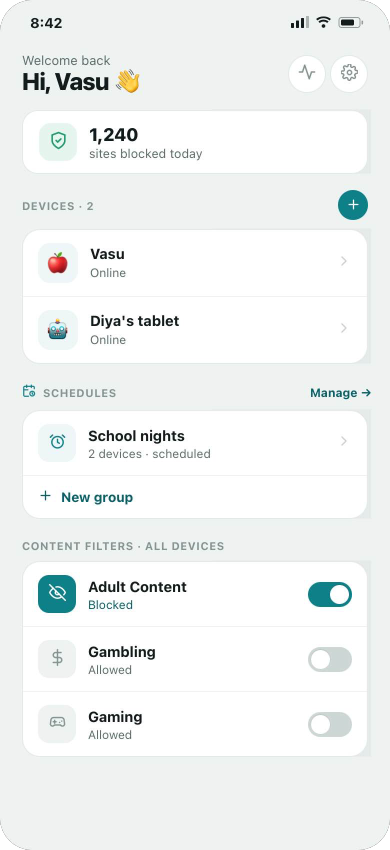
Zaksha family dashboard — devices and schedules
Bedtime · 9:30 PMApplies to every device
Adult contentBlocked across the household
Now in beta

The office filter that doesn’t get switched off.

Managed content filtering for the devices you run. A flat DNS block breaks someone's job by lunchtime — Zaksha does groups: each team gets rules that fit its work, scam and phishing domains stay blocked for everyone, and per-employee reports show what's happening on the devices you own. No IT hire needed.
Different rules per team MDM & BYOD setup From ₹499 / month
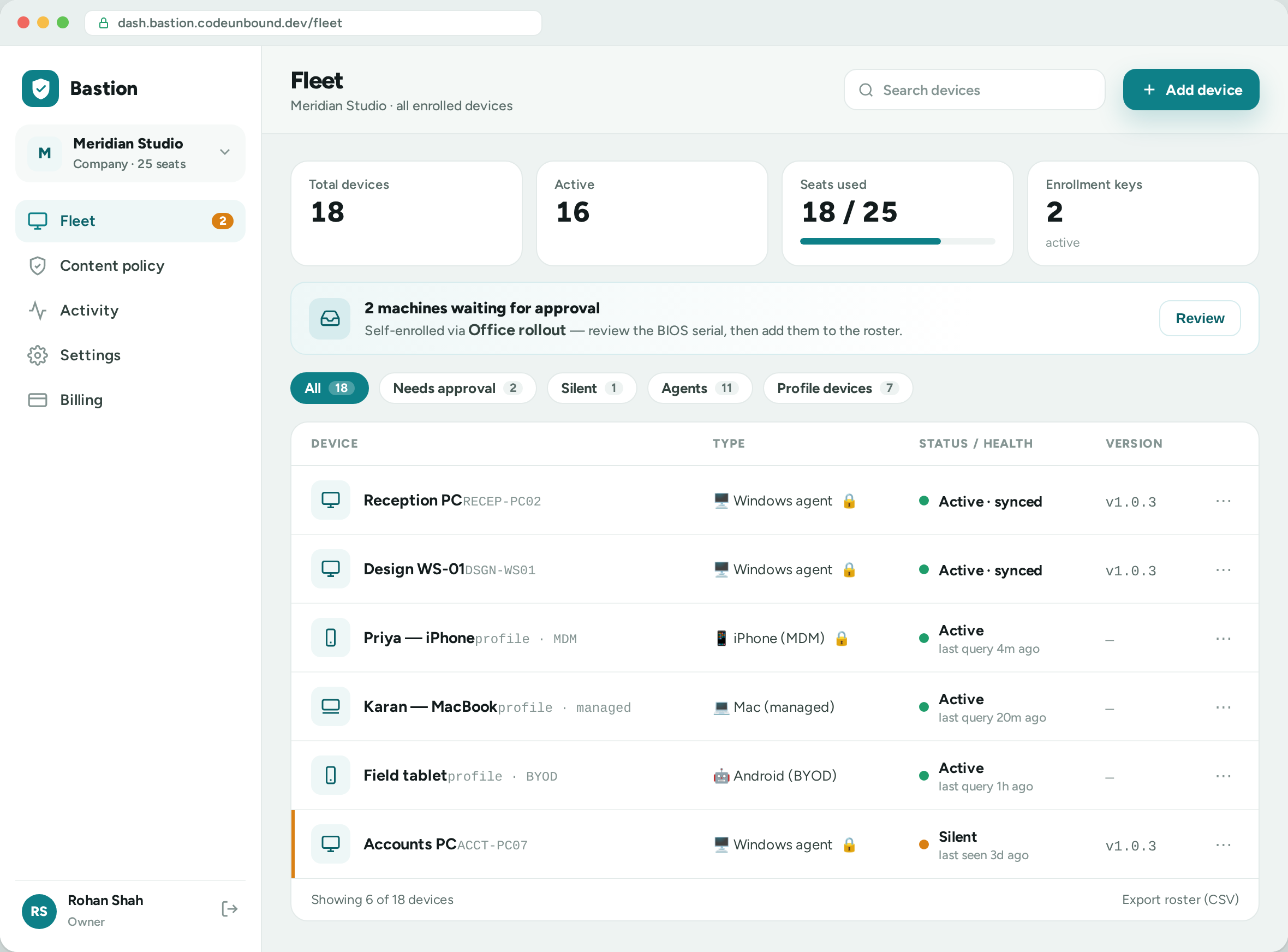
Zaksha Fleet console — a company's Windows agents and managed phones in one roster
Scam link blockedAutomatic, on every device
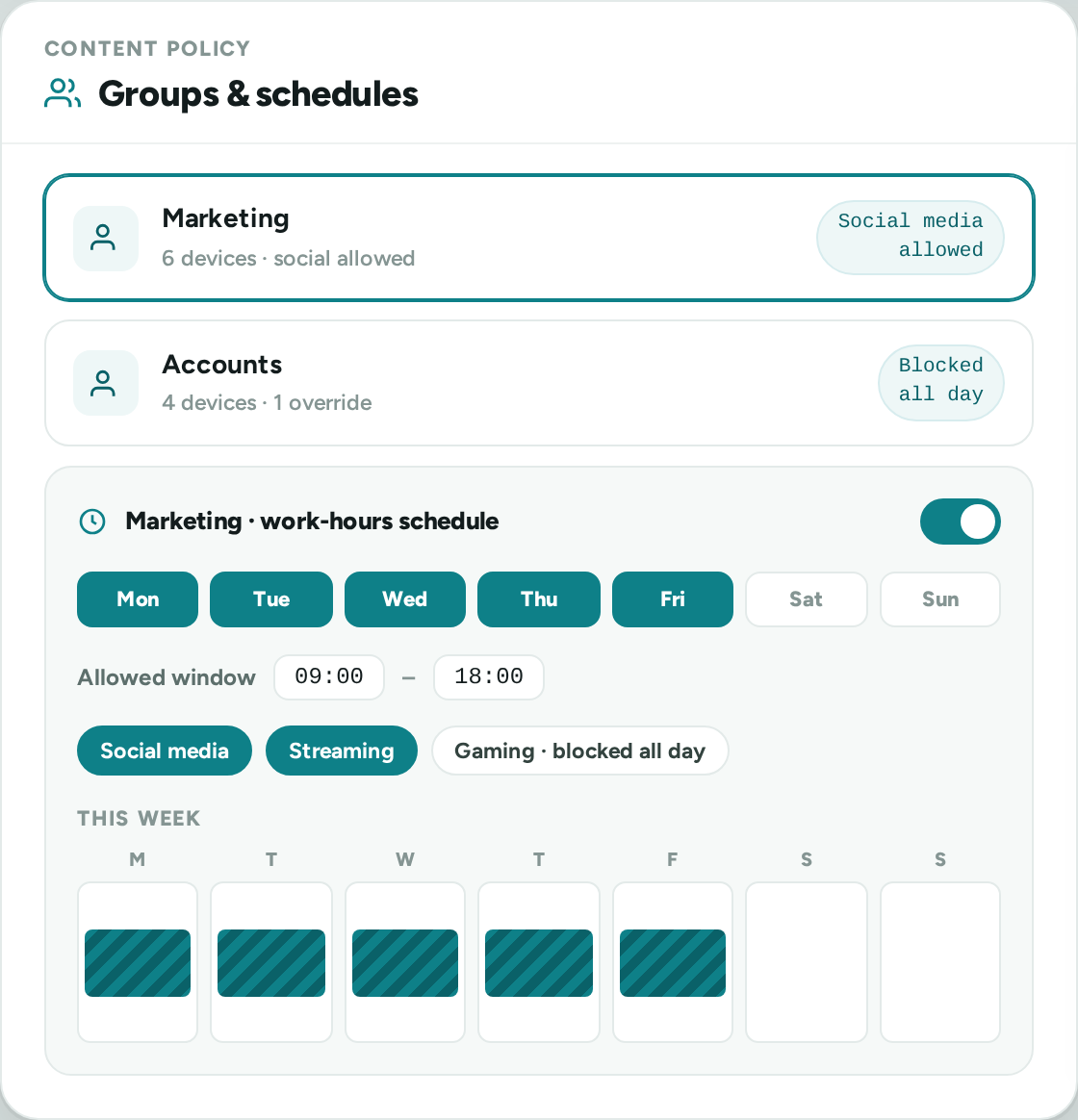
Marketing · social allowedBack office · blocked all day
Now in beta

A safe, age-appropriate internet on every school device.

Parents trust your school with their children. Zaksha helps you show that trust is kept — age-appropriate rules for every grade, a documented record if a parent or the board ever asks, and exam lockdown — all run for you on your own isolated instance, with support and an SLA.
Dedicated isolated instance Reporting & 30 / 90-day history Support & SLA
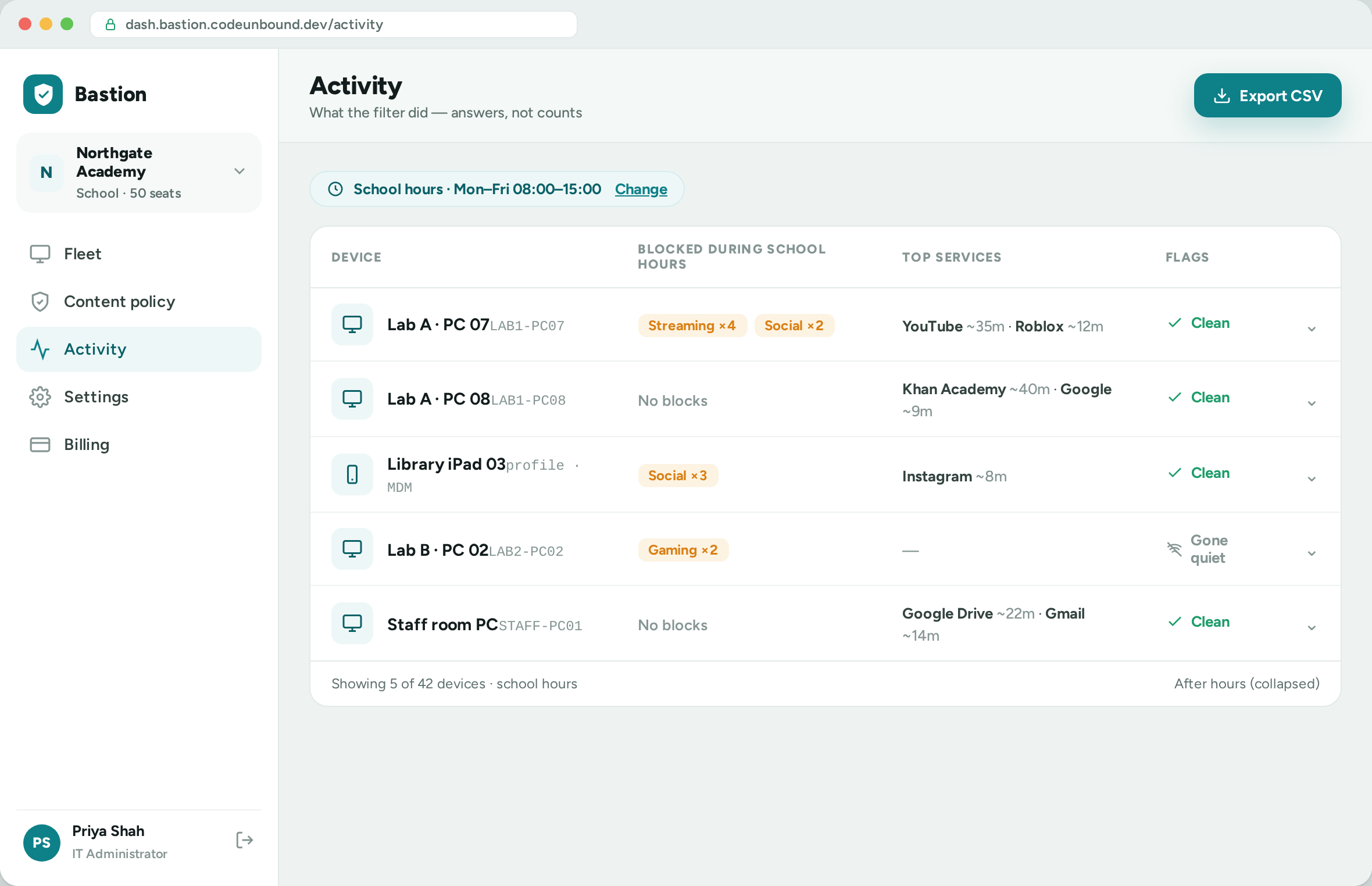
Zaksha Activity console — per-device record across the school's fleet on a dedicated instance
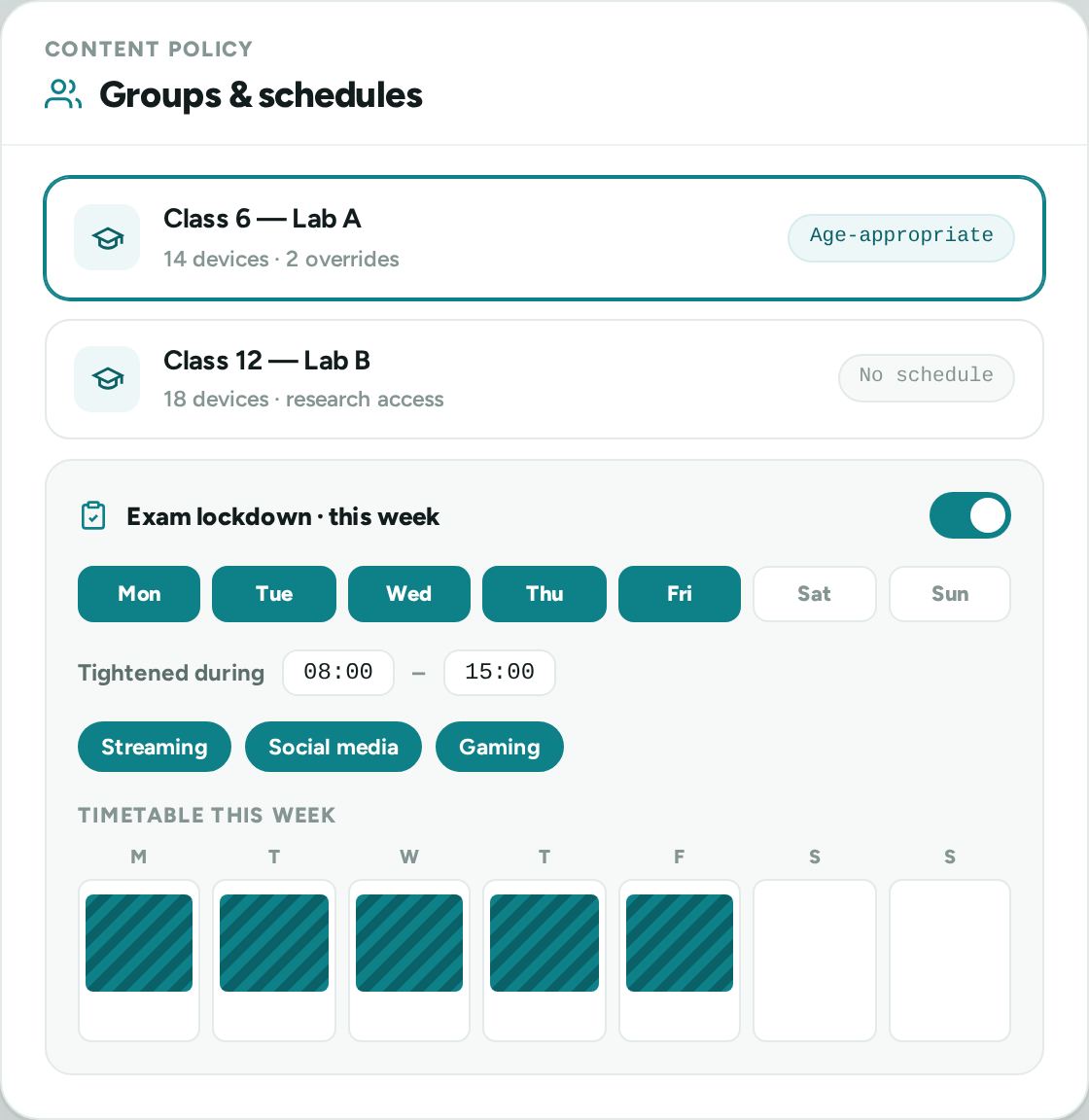
Exam lockdownTighten rules for exam week
Safeguarding reportA record for parents & management
Schedules, not just blocks
No router or hardware
Works on any network
We run it for you
Different rules for different teams
Scam & phishing blocked for all
Per-employee reports
No IT hire needed
Documented safeguarding record
Your own isolated instance
Exam lockdown
Support & SLA
The difference

Schedule the internet — not just block it.

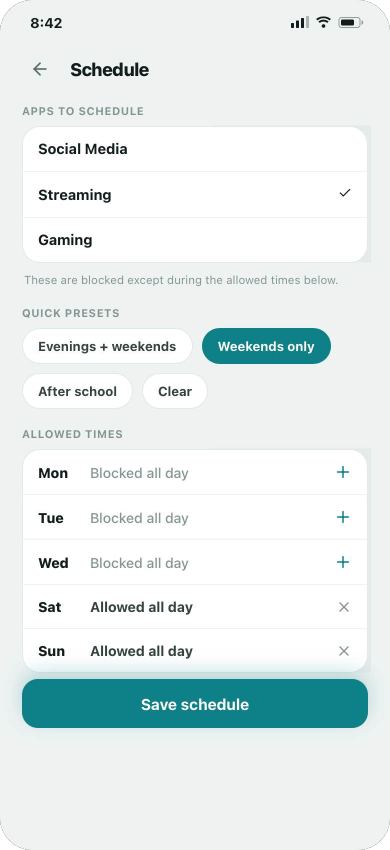
Anyone can block a category. What Zaksha makes effortless is time and groups: rules that turn on and off by the clock and the calendar, set once on an account and fanned out across every device on it.

  • Time-based windows

    Allow YouTube only between 6–8pm. Apps and categories switch on and off automatically — no nightly nagging, no manual toggling.

  • Weekday vs weekend rules

    Block gaming on weekdays, allow it on weekends. Different rules for school nights and free days, set per day of the week.

  • One toggle, every device

    Flip a rule on the account and it applies to all that account's devices at once — a child's phone and tablet, or a whole company.

Category blocking is included — it's table stakes: Adult Gambling Social Gaming Streaming
Zaksha schedule editor — apps, presets and allowed times
The difference

One rule for everyone is why filters get switched off.

You've probably tried a flat DNS block — and by lunch, marketing needed Instagram. So the block grew holes until someone quietly turned it off. Zaksha is built for how an office actually works: rules per team, a security floor for everyone, and a record you can check.

  • Groups, not one big switch

    Marketing — social allowed. Accounts — blocked all day. Put devices in groups once and every rule fits the team it's for. New joiner? Add them to the group — done.

  • A floor that's never traded away

    Allowing social for marketing never means allowing the bad click. Known scam, phishing and malware domains stay blocked for every group — on by default, on every device.

  • Know if something's wrong

    Per-employee reports on company-owned devices — top domains and what was blocked, by group. Not surveillance theatre; a record you can act on when something looks off.

Category blocking is included — it's table stakes: Adult Gambling Social Gaming Streaming
Zaksha groups & schedules — per-team rules and a work-hours schedule for the fleet
The difference

When a parent asks, you'll have the answer.

Parents trust the school with their children's attention and safety. Zaksha turns that duty into something you can show — age-appropriate filtering on every school device, with a documented record behind it, run for you on your own instance.

  • A record, not a reassurance

    Per-device history kept for 30 or 90 days on your own server. If a parent or the board asks what happened, the answer is a report — not a shrug.

  • The right rules for every grade — and every period

    Class 6 isn't Class 12. Grade-wise groups keep rules age-appropriate, schedules track the timetable and lab periods, and everything tightens into exam lockdown when integrity matters most.

  • Your students' data, on your server

    A dedicated, physically isolated instance — never pooled with other customers, supported with an SLA. A line you can repeat to parents.

Category blocking is included — it's table stakes: Adult Gambling Social Gaming Streaming
Zaksha groups & schedules — grade-wise groups, timetable and exam-week lockdown
Why on the device

Why filtering at the router isn't enough.

The obvious idea is to block at the homeofficeschool router and be done. It sounds tidy — but a router only guards one Wi-Fi, treats every device the same, and protects nothing the moment a phone swaps to mobile data or a friend's Wi-Fia laptop or phone hops onto a personal hotspota student swaps the school Wi-Fi for a mobile dongle. Zaksha filters on the device itself, so the rules travel with it.

Blocking at the router
  • Only works on that one Wi-Fi. Switch to mobile data or a friend's Wi-Fi and the filter is simply gone — the device is wide open.Switch to a personal hotspot or mobile data and the filter is simply gone — the laptop is wide open.Pop in a mobile dongle or data-card — the most common way around school Wi-Fi — and the filter is simply gone; the device is wide open.
  • One rule for everyone. A router can't tell a 7-year-old's tablet from a parent's laptop — so the whole house gets the same blocklist.A router can't tell marketing from accounts, or a guest phone from a workstation — so the whole office gets the same blocklist.A router can't tell a junior-class tablet from a staff laptop, or the library PC from the exam hall — so the whole campus gets the same blocklist.
  • No idea which device did what. It can't separate one device from another, so there's no per-device report and no schedule that follows a person.
  • Sidestepped in seconds. Any other network — even a phone's own hotspot — skips the router completely.
Zaksha on each device
  • Follows the device everywhere. Wi-Fi, mobile data, any network — the same rules apply, because they live on the device, not the wall socket.
  • The right rules for the right device. Per-child, per-team and per-device rules and schedules — homework hours on one, social allowed on another.social off for the floor, full access for marketing.exam lockdown for one grade, research access for another.
  • A clear per-device record. See what each device reached and what was blocked — something you can actually act on.
  • Nothing to plug in. No new router, no hardware — a one-tap profile or a single setting; managed Windows PCs add a tamper-resistant agent.
How it works

Set up in minutes, not an afternoon.Onboard the whole office from one key.Onboard a whole lab from one key.

Three steps, then we run it for you. Nothing to plug in, nothing to root or jailbreak.One installer for every Windows PC — nothing to plug in.One installer for every lab PC — nothing to plug in.

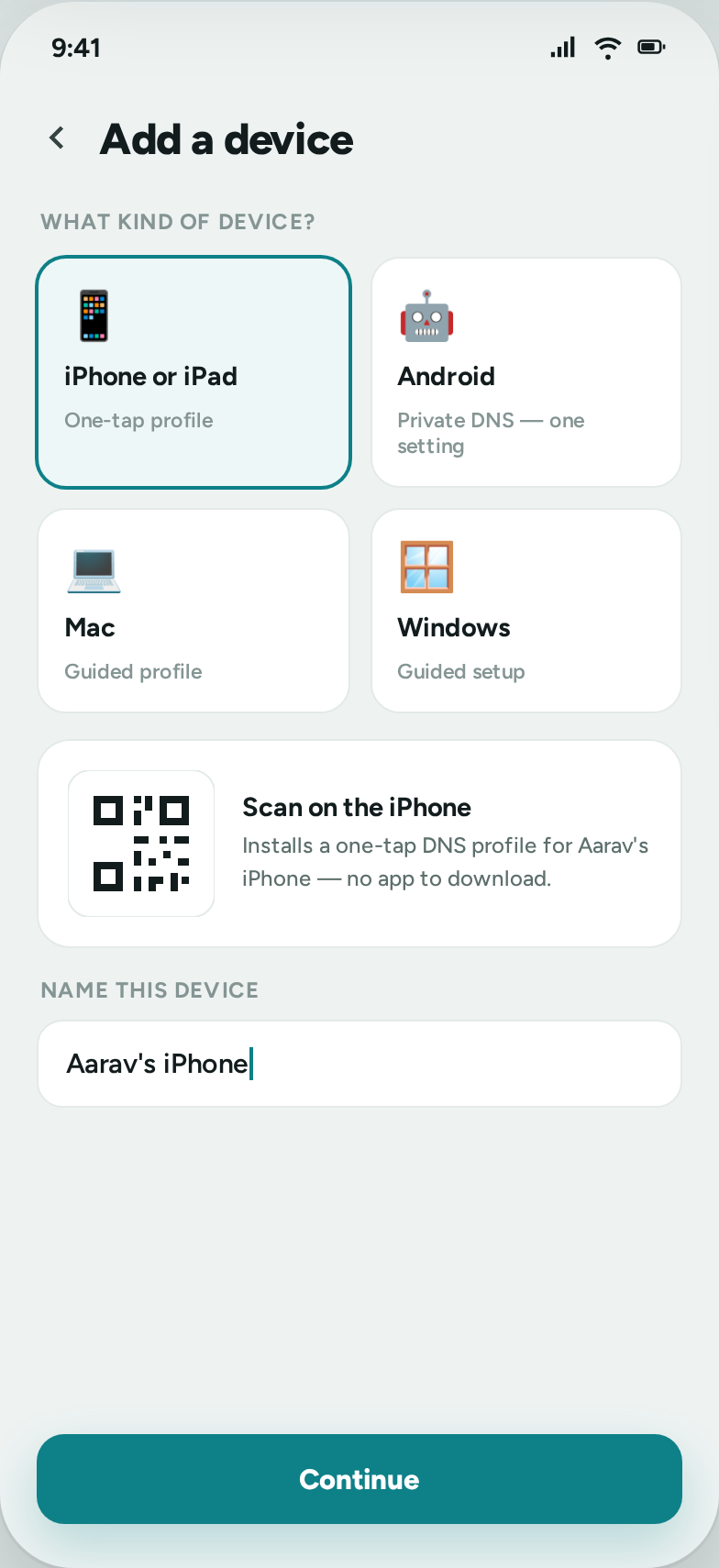
Add a device — pick a platform, set up from a QR or one-tap profile Apply a schedule — apps, presets and allowed times Manage from anywhere — the family dashboard
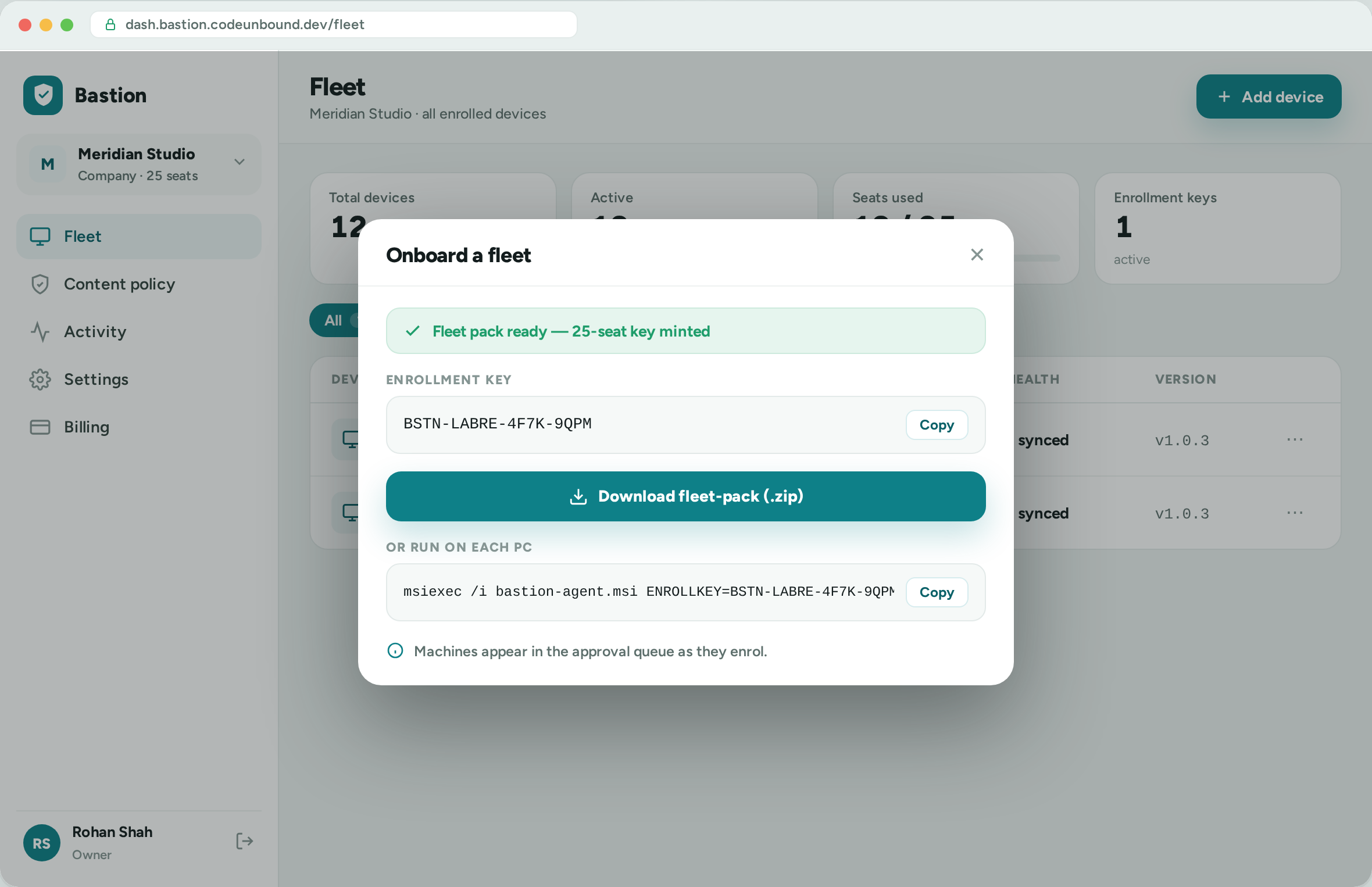
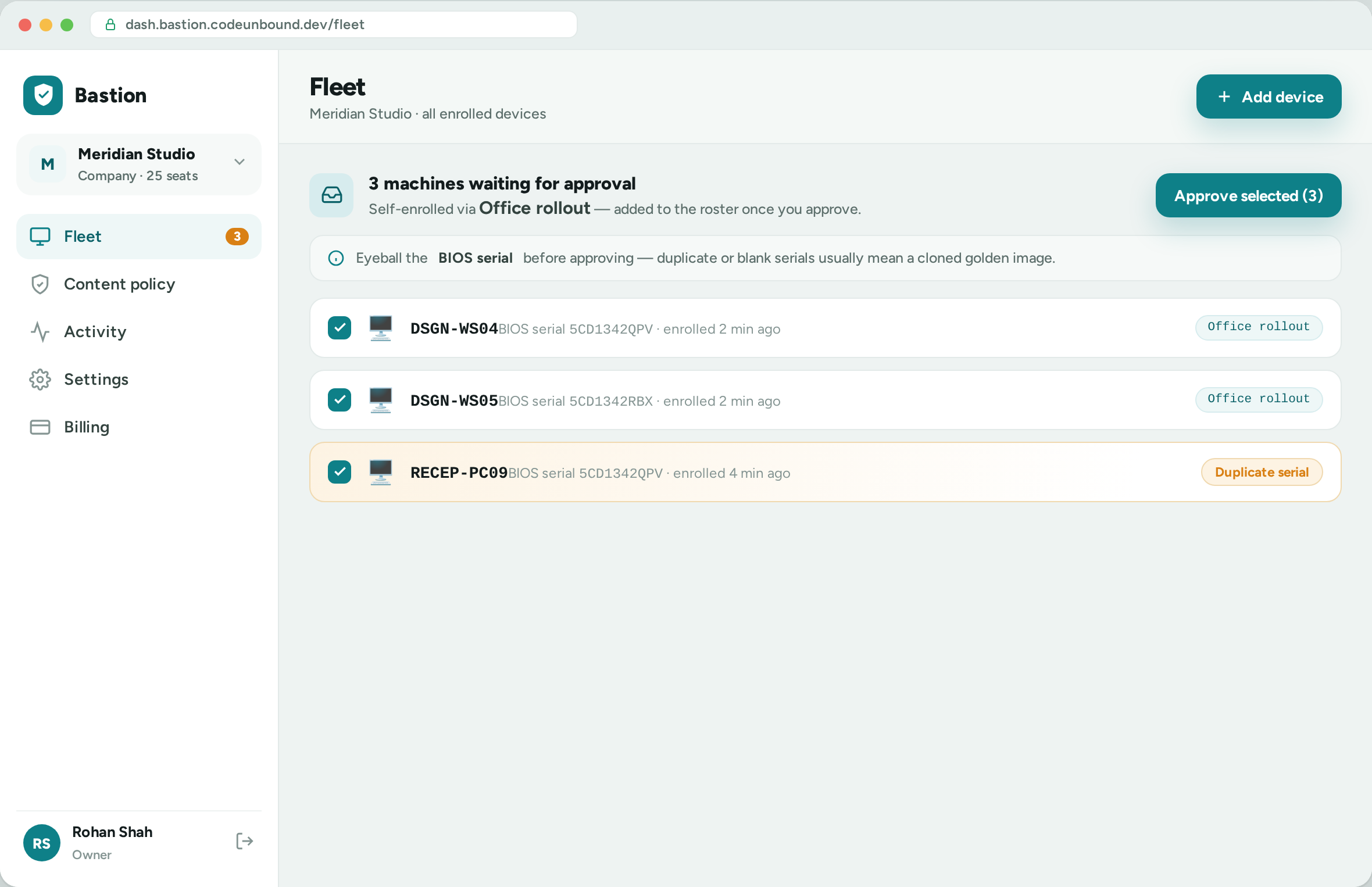
Roll out one installer — mint a key, download the fleet pack, run msiexec Approve machines in bulk — the enrollment approval queue Watch fleet health — the device roster with statuses
Roll out one installer — mint a key, download the fleet pack, run msiexec Approve a whole lab — the enrollment approval queue with duplicate-serial flags Keep the record — the per-device Activity console
Features

Everything you need to draw the line.

Scheduling leads.Protection leads.Accountability leads. The rest is thoughtful defaults out of the box, with the controls to go further when you need them.

Fleet enrolment & health

One installer brings every company or school Windows PC on board — approve them in bulk, see each machine's agent version, and spot any that has gone silent or had its filter reverted.

Time & group schedules

Allowed-time windows per app and category, per day of the week. Group devices so a single rule covers a child or a whole team.

Account-wide rules

One toggle on an account fans out across all its devices — change a rule once instead of device by device.

Category blocks & custom rules

Adult, gambling, social, gaming and streaming — curated blocklists, one tap. Plus block or allow any specific domain, per device or account-wide.

Scam & malware protection

Known phishing, scam and malware domains are blocked automatically on every device — on by default, nothing to configure, on every plan.

Activity history

Top domains and what was allowed or blocked, per device. Home keeps a rolling 7 days, then it's gone — processed and stored in India, never leaving our production environment.

Per-device isolation

Each device gets its own address, so rules and history never mix up. Logical on shared cloud, physical on a dedicated instance.

Works everywhere

Every device your family actually uses.your team actually uses.your students actually use.

A one-tap profile or a single DNS setting — then the same managed filtering follows the device everywhere, on Wi-Fi and mobile data.

iPhone & iPadOne-tap configuration profile
AndroidPrivate DNS — one setting
macOSGuided configuration profile
Windows NewBypass-resistant Zaksha agent — or guided DNS
LinuxGuided DNS-over-HTTPS setup
Your data, simply

What we can see — and what we can't.

No jargon. Here's exactly what Zaksha looks at, where your information lives and how long it stays — in plain words a normal person can check.

Nothing to install on phones

On phones, tablets and Macs there's no app to download — Zaksha is just a setting we help you switch on. Only managed Windows PCs add a small company agent.

We see website names, not what's inside

Zaksha works at the address-book level. It sees that a device asked for, say, youtube.com — never your messages, photos, passwords or anything on the page. We couldn't read those if we tried.

Your data stays in India

Everything is processed and stored on our servers in India and never leaves them. No third-party trackers, no sending your activity off to anyone else.

History deletes itself

Home keeps a rolling 7 days of activity, then it's genuinely gone. The window you can see is the only window we keep — nothing is hoarded in the background.

No ads. Nothing sold.

You pay a simple subscription by UPI. We don't show ads and we don't sell or share your browsing — selling your data isn't our business model, your money is.

Each device kept separate

Every device gets its own private address, so one device's rules and history never mix with another's — or with any other customer's.

Straight talk

What Zaksha can and can't do.

Filtering is a strong layer, not a magic wall. We'd rather you know exactly where the edges are.

Where it's strong
  • Cooperative and managed devices — young kids, and MDM-locked company or school devices where the profile can't be removed and VPN installs are restricted.
  • It neutralises Apple iCloud Private Relay so it can't quietly route around your rules.
  • Blocks whole categories and specific sites, on schedule, across every device — on Wi-Fi and mobile data.
  • Gives the account owner a clear, per-device record of what was reached and what was blocked.
Where the limits are
  • On an adversarial BYOD device — say, a teen who actively wants around it — DNS filtering is bypassable. Anyone who can change the DNS setting or run a VPN can tunnel past it.
  • Protect the DNS setting with a Screen Time or device PIN, and restrict VPN installs, to keep rules intact.
  • Enforcement is strongest on devices you own and manage. On personal devices it relies on cooperation.

A bypass-resistant Android app and school-fleet management for Windows are on our roadmap.

What you see — and what your team should know. Zaksha reads domain names only — never page content, messages or keystrokes. Reports cover the company-owned devices you enrol, and history is kept for your plan's window, then deleted. Most owners say so up front — our acceptable-use policy templates make that easy.
What the school sees — and what students should know. Domain names only — never page content, messages or keystrokes. Reports cover school-owned, managed devices, and the record stays on your own instance for 30 or 90 days. It exists to protect students and staff alike — and it's worth saying so openly.
Simple pricing

₹199 a month. The whole household.

One flat price for up to 5 devices — every feature included, paid by UPI, cancel anytime. Annual saves about 20%.

See full pricing Get started
Simple pricing

₹599 a month. First 10 devices in.

Then ₹49 per extra device — no cap, and no forced upgrades. GST invoicing included; annual saves about 20%.

See full pricing Get started
Simple pricing

A dedicated instance, sized to your school.

Enterprise is quoted custom — physical isolation, 30 or 90-day retention, provisioning done for you, support and an SLA. GST invoicing included.

Talk to us See full pricing
FAQ

Questions, answered.

How is this different from a free DNS filter?

Category blocking is a commodity — every free filter does it, and so do we. Zaksha's value is the layer on top: easy time- and group-based schedules, multi-device management where one rule covers a whole account, effortless onboarding, and a managed service we run for you.

Do I need to install an app on every device?

No. Zaksha works by setting a device's DNS — on iOS and macOS you install a small configuration profile, and on Android you set a Private DNS hostname. We give you guided, device-specific steps for each platform.

Can my childan employeea student just turn it off?

On a device where they can freely change DNS settings, yes — DNS filtering is bypassable by anyone who can change the setting or install a VPN. Protect those settings with a Screen Time passcode or device restrictions. On company- or school-managed devices enrolled via MDM, the profile can't be removed by the user.

Is the dashboard real-time?

Not quite — stats are computed in periodic batches, roughly every half hour. We show you blocked today, the last 24 hours and the last 7 days, rather than a live feed.

How long do you keep my activity history?

On Home, raw query history is kept for a rolling 7 days and then genuinely deleted. The window you can view is the window we retain. Enterprise instances can keep 30 or 90 days on their own dedicated server. Extending the window only adds data going forward — previously-deleted history doesn't come back. All activity data is processed and stored in India, inside our production environment — it never leaves it.

What can I see about my employees?

Domain-level activity only — which sites were reached or blocked, per device, on the company-owned devices you enrol. Zaksha is DNS-based: it never reads page content, messages or keystrokes. History is kept for your plan's window and then deleted.

Do you provide GST invoices?

Yes — Team and Enterprise plans include GST invoicing. Home plans are paid via UPI.

Is our school's data separate from other customers?

Yes. Enterprise runs on a dedicated VPS provisioned for your school — physical isolation, not just logical. History (30 or 90 days) stays on your own instance, and all activity data is processed and stored in India.

Decide when the internet is on.

Zaksha is live, in open beta. Set up your first device in minutes — no waitlist.

A filter the whole office can live with.

Zaksha is live, in open beta. Group the team's devices in minutes — 10 included from ₹599 a month.

Show parents the trust is kept.

Tell us about your school — we'll provision a dedicated instance and run it for you.